


Control panel
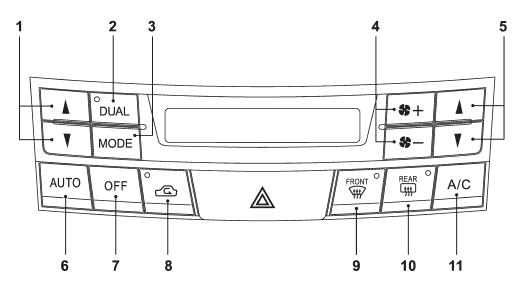
1) Temperature control button (driver’s side)
2) Dual mode button
3) Airflow mode selection button
4) Fan speed control button
5) Temperature control button (front passenger’s side)
6) AUTO button
7) OFF button
8) Air inlet selection button
9) Defroster button
10) Rear window defogger button (Refer to “Defogger and deicer” F3-34.)
11) Air conditioner button
See also:
Vehicle Dynamics Control OFF switch
Pressing the switch to deactivate the Vehicle Dynamics Control system can facilitate
the following operations.
● a standing start on a steeply sloping road with a snowy, gravel-covered, or ...
Tires
*1: This torque is equivalent to applying approximately 88 to 110 lbf (40 to
50 kgf) at the end of the wheel nut wrench. If you have tightened the wheel nuts
by yourself, have the tightening tor ...
Reporting safety defects (USA)
If you believe that your vehicle has a defect which could cause a crash or could
cause injury or death, you should immediately inform the National Highway Traffic
Safety Administration (NHTSA) in ...