


Audio control buttons (if equipped)
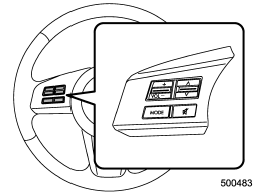
Type A audio
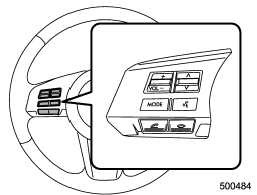
Type B audio
These buttons are located on the spokes of the steering wheel. They allow the driver to control audio functions without taking his/her hands off the steering wheel.
See also:
Parking tips
When parking your vehicle, always perform the following items.
● Apply the parking brake.
● For MT models, put the shift lever in the “1” (1st) for upgrade or “R” (Reverse)
for a downg ...
Drive belts
1) Power steering oil pump pulley
2) Front side belt
3) Alternator pulley
4) Air conditioner compressor pulley
5) Rear side belt
6) Crank pulley
A) 22 lbf (98 N, 10 kgf)
The front side be ...
Using your Owner’s Manual
Before you operate your vehicle, carefully read this manual. To protect yourself
and extend the service life of your vehicle, follow the instructions in this manual.
Failure to observe these instr ...