


Removing and reinstalling clips
Removing clips
There are several types of clips used for your vehicle
Type A clips
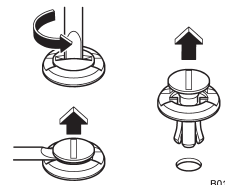
1. Turn the clips counterclockwise using a flat-head screwdriver until the center portion of the clip is raised.
2. Remove the clips with a flat-head screwdriver using leverage.
Type B clips
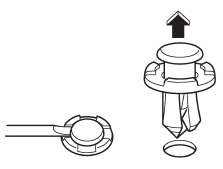
1. Pull out the center portion of the clip using a flat-head screwdriver as shown in the illustration.
2. Pull the protruded center portion to remove the entire body of the clip.
Type C clips
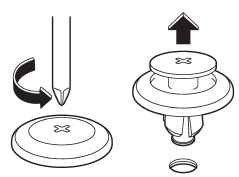
1. Turn the clip counterclockwise using a Phillips screwdriver until the center portion of the clip is raised.
2. Remove the entire clip by pulling it up.
Reinstalling clips
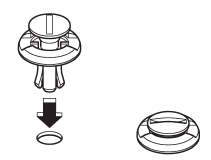
Type A clips
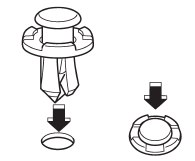
Type B clips
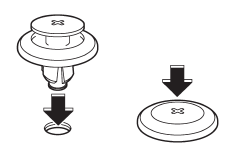
Type C clips
Insert the clip without the center portion first and then push the center portion of the clip into the hole.
See also:
To arm the system using power door locking switches
1. Close all windows.
2. Remove the key from the ignition
switch.
3. Open the doors and get out of the
vehicle.
4. Make sure that the engine hood is
locked.
5. Close the doors and the rear g ...
MODE button
This button is used to select the desired audio mode. Each time it is pressed,
the mode changes to the next one in the following sequence.
*1: The frequency last received in the selected waveba ...
Snow tires
- When replacing original tires with
winter (snow) tires, make sure
you use only the same size,
construction and load range as
the original tires listed on the tire
placard. Using other ...