


Unlocking the doors
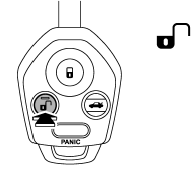
Press the “ ” button to unlock the
driver’s door. An electronic chirp will sound twice and the turn signal lights will
flash twice. To unlock all doors and the rear gate (Outback), briefly press the
“” button a second time within 5 seconds.
NOTE
If the interval between the first and second presses of the “”
button (for unlocking of all of the doors and the rear gate) is extremely short,
the system may not respond.
See also:
Cruise control indicator light
This light illuminates when the “CRUISE” main switch is pressed.
NOTE
• If you press the “CRUISE” main switch button while turning the ignition switch “ON”, the cruise control function is deactiva ...
Gross Axle Weight (GAW) and Gross Axle Weight Rating (GAWR)
Gross Axle Weight
The total weight applied to each axle (GAW) must never exceed the Gross Axle
Weight Rating (GAWR). The front and rear GAWs can be adjusted by relocating passengers
and luggage ...
Electronic Brake Force Distribution (EBD) system
The EBD system maximizes the effectiveness of the brakes by allowing the rear
brakes to supply a greater proportion of the braking force. It functions by adjusting
the distribution of braking forc ...