


Checking the fluid level
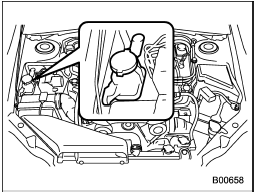
The power steering fluid expands greatly as its temperature rises; the fluid level differs according to fluid temperature.
Therefore, the reservoir tank has two different checking ranges for hot and cold fluids.
Check the power steering fluid level monthly.
1. Park the vehicle on a level surface, and stop the engine.
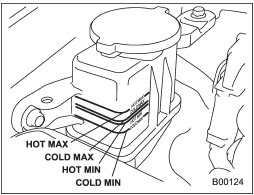
2. Check the fluid level of the reservoir tank.
When the fluid is hot after the vehicle has been run: Check that the oil level is between “HOT MIN” and “HOT MAX” on the surface of the reservoir tank.
When the fluid is cool before the vehicle is run: Check that the oil level is between “COLD MIN” and “COLD MAX” on the surface of the reservoir tank.
3. If the fluid level is lower than the applicable “MIN” line, add the recommended fluid as necessary to bring the level between the “MIN” and “MAX” line.
If the fluid level is extremely low, it may indicate possible leakage. Consult your SUBARU dealer for an inspection.

Be careful not to burn yourself because the fluid may be hot.

• When power steering fluid is being added, use only clean fluid, and be careful not to allow any dirt into the tank. And never use different brands together.
• Be careful not to spill power steering fluid when adding it. If power steering fluid touches the exhaust pipe, it may cause a bad smell, smoke, and/or a fire. If power steering fluid gets on the exhaust pipe, be sure to wipe it off.
See also:
To open and close the trunk lid from outside
The trunk lid can be opened using the remote keyless entry system. Refer to “Remote keyless entry system”.
To close the trunk lid, lightly press the trunk lid down until the latch engages.
NOTE
Do ...
Meter/Gauge needle illumination setting (turbo models except STI)
When the setting is activated or deactivated, the meter needles and gauge needles illuminate and turn off as follows.
Activated:
When the driver’s door is opened while the ignition switch is in the ...
Registering from call history
1. Select the “CALL HISTORY” menu.
2. Select “OUTGOING” or “INCOMING”
by operating the “TUNE/TRACK/CH” dial.
3. Select the phone number by operating
the “TUNE/TRACK/CH” dial.
4. Select the “REC ...