


SI-DRIVE indicator light (STI)
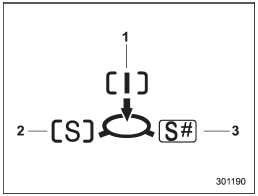
1) Intelligent (I) mode
2) Sport (S) mode
3) Sport Sharp (S#) mode
This light indicates the current SI-DRIVE mode.
For details of SI-DRIVE mode, refer to “SIDRIVE (STI)”.
See also:
Function settings
A SUBARU dealer can change the settings of the functions shown in the following
table to meet your personal requirements. Contact the nearest SUBARU dealer for
details.
...
Tire pressures
WARNING
Driving at high speeds with excessively low tire pressures can cause the tires
to deform severely and to rapidly become hot. A sharp increase in temperature could
cause tread separation, ...
Trailer lights
CAUTION
Direct splicing or other improper connection of trailer lights may damage your
vehicle’s electrical system and cause a malfunction of your vehicle’s lighting system.
Connection of trailer ...