


Replacing the battery

- Do not let dust, oil or water get on or in the transmitter when replacing the battery.
- Be careful not to damage the printed circuit board in the transmitter when replacing the battery.
- Be careful not to allow children to touch the battery and any removed parts; children could swallow them.
- There is a danger of explosion if an incorrect replacement battery is used. Replace only with the same or equivalent type of bat- tery.
- Batteries should not be exposed to excessive heat such as sunshine, fire or the like.
When the transmitter battery begins to get weak, transmitter range will begin to decrease. Replace the battery as soon as possible.
To replace the battery:
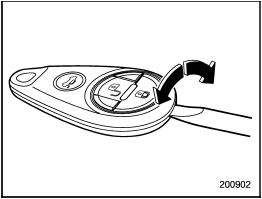
1. Open the transmitter case using a flathead screwdriver.
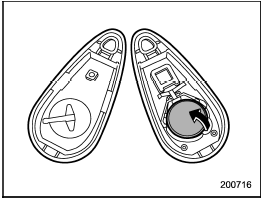
2. Remove the old battery from the holder.
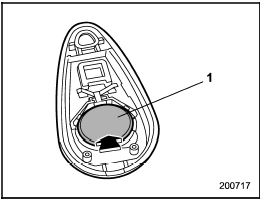
1) Negative (−) side facing up
3. Replace with a new battery (type CR2025 or equivalent) making sure to install the new battery with the negative (−) side facing up.
4. Refit the removed half of the transmitter case.
After the battery is replaced, the transmitter must be synchronized with the keyless entry system’s control unit.
Press either the “ ” or “
 ”
button six
times to synchronize the unit.
”
button six
times to synchronize the unit.
See also:
Electronic Brake Force Distribution (EBD) system warning
The brake system warning light also illuminates if a malfunction occurs in the EBD system. In that event, it illuminates together with the ABS warning light.
The EBD system may be malfunctioning if t ...
Going & Stopping
Subaru increased the Tribeca's standard horizontally opposed six-cylinder
from 3.0 to 3.6 liters for 2008. The new engine makes 256 horsepower, which is a
modest increase over the previous engine' ...
Other markings
The following makings are also
placed on the sidewall. ...