


Feature of distance marker
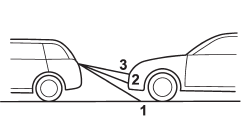
1) 3 feet (1 m) line
2) 6.5 feet (2 m) line
3) 10 feet (3 m) line
The distance marker shows the distance on the road. If there is a car or other object close behind, distance cannot be correctly displayed.
See also:
Fastening the seatbelt
- Never use a belt that is twisted or
reversed. In an accident, this can
increase the risk or severity of
injury.
- Keep the lap belt as low as
possible on your hips. In a collision,
th ...
ABS warning light
The ABS warning light illuminates when the ignition switch is turned to the “ON”
position and turns off after approximately 2 seconds.
This is an indication that the ABS system is working properl ...
SRS airbag (Supplemental Restraint System airbag)
*SRS: This stands for supplemental restraint
system. This name is used because
the airbag system supplements the
vehicle’s seatbelts.
Your vehicle is equipped with a crash
sensing and diagnos ...