


Control panel
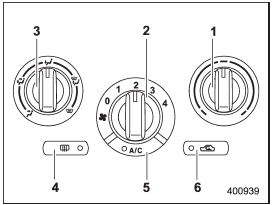
Control panel
1) Temperature control dial
2) Fan speed control dial
3) Airflow control dial
4) Control switch of the defogger and deicer system (Refer to “Defogger and
deicer”.)
5) Air conditioner button
6) Air inlet selection button
See also:
Canceling the function for meter/gauge needle movement upon turning on the ignition
switch
It is possible to activate or deactivate the movement of the meter needles and
gauge needles that takes place when the ignition switch is turned to the “ON” position.
1. Turn the ignition switch ...
Play file
Refer to “Play file”. ...
Outside temperature indicator
Outside temperature indicator
1) U.S.-spec. models
2) Except U.S.-spec. models
The outside temperature indicator shows
the outside temperature in a range from
−22 to 1228F (−30 ...