


Mist (for a single wipe)
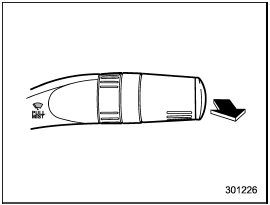
Mist (for a single wipe)
For a single wipe of the wipers, pull the lever toward you. The wipers operate until you release the lever.
See also:
Unfastening the rear center seatbelt
Push the release button of the center seatbelt buckle (on the left-hand side)
to unfasten the seatbelt.
1. Insert a key or other hard pointed object into the slot in the connector (buckle)
...
Repeating
Repeating is operated in the same way a
CD is played. Refer to “Repeating”.
Each time you briefly press the
button (type C audio)/ button (the
“RPT” button) (type D audio), the mode
chang ...
For CVT models
This light illuminates when All-Wheel Drive is disengaged and the drive mechanism
is switched to Front Wheel Drive for maintenance or similar purposes. This light
flashes if the vehicle is driven ...