


Windshield wiper blade rubber
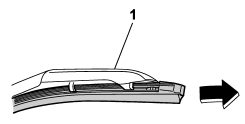
1) Support
1. Grasp the locked end of the blade rubber assembly and pull it firmly until the stoppers on the rubber are free of the support.
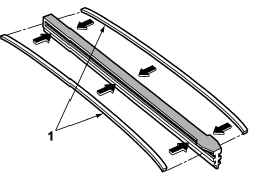
1) Metal spines
2. If the new blade rubber is not provided with two metal spines, remove the metal spines from the old blade rubber and install them in the new blade rubber.
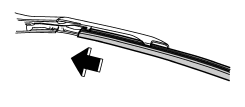
3. Align the claws of the support with the grooves in the rubber and slide the blade rubber assembly into the support until it locks.
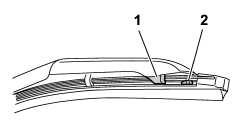
1) Claw
2) Stopper
4. Be sure to position the claws at the end of the support between the stoppers on the rubber as shown. If the rubber is not retained properly, the wiper blade may scratch the windshield.
See also:
Rear ashtray (STI – if equipped)
Rear ashtray (STI – if equipped)
The rear ashtray is located on the upper side of the back of the center console. To open the ashtray, pull the upper edge of the lid.
Fully close the lid after using ...
MUTE button (models without Hands-free system)
Press the “” button if you wish
to
immediately cut the volume to zero.
The audio display will show “MUTE”.
If you press the button again, the original
sound volume will return and “MUTE”
t ...
To increase the speed (by accelerator pedal)
1. Depress the accelerator pedal to
accelerate the vehicle to the desired
speed.
2. Push the “SET/COAST” button once.
Now the desired speed is set and the
vehicle will keep running at that spe ...