


Setting the alarm-level engine speed
1. Push the trip knob to select “REV” on the combination meter.
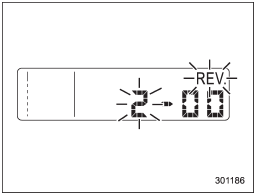
2. When the trip knob is pushed for more than 2 seconds, the thousands place flashes.
3. Release your finger from the trip knob once, then push and hold the trip knob again. The number will change sequentially from 2 to 7. Release your finger at the desired alarm-level engine speed.
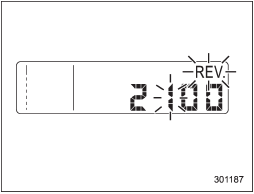
4. When the trip knob is pushed, the hundreds place flashes.
5. Release your finger from trip knob once, then push and hold the trip knob again. The number will change sequentially from 0 to 9. Release your finger at the desired alarm-level engine speed.
6. When the trip knob is pushed, the buzzer sounds and the REV alarm system will automatically enter its new setting mode (step 7 below), in which you can activate or deactivate the buzzer.
<Selectable engine speed range>
The alarm-level engine speed can be set (in 100 rpm steps) within the range from 2,000 rpm to 7,000 rpm.
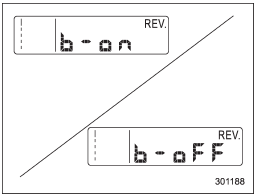
7. Every time that the trip knob is pushed and held, the buzzer changes to activate or deactivate.
b – on: Activated
b – off: Deactivated
When the mode is changed to “activate”, the buzzer sounds.
8. Push the trip knob to complete the setting procedure.
NOTE
• The REV alarm system does not operate while settings are being entered.
• The speed-setting mode terminates if “--00” rpm is selected.
• The speed-setting mode is canceled if the ignition switch is turned from ON to OFF, OFF to ON, or the vehicle starts moving before the setting procedure is finished.
• Setting the speed is impossible when the vehicle is moving.
• The set engine speed may differ from the engine speed shown by the tachometer. Use the engine speed shown by the tachometer as a rough guide.
• If the setting operation is performed with the engine switch turned off, the REV indicator light turns off and the setting operation is aborted when you have stopped the setting operation for approximately 10 seconds.
• If the setting operation is performed with the engine switch turned off, the REV indicator light turns off and the setting operation is aborted when you open and close the driver’s door.
See also:
Making a phone call from speed dial
It is possible to select a phone number
from speed dial registered with the invehicle
equipment to make a phone call.
1. Select the top menu (phone menu).
2. Press the preset button (from
to
...
Preset buttons
How to preset channels
1. Press the “SAT” button to select SAT1, SAT2 and SAT3 reception.
2. Select the desired channel.
3. Press one of the preset buttons for more than 1.5 seconds to store the ch ...
2010 Subaru Legacy review
The 2010 Subaru Legacy's redesign has been long overdue. Its sophisticated
new look is sleek, but as Mom always says it's what's on the inside that counts.
The sedan's redesign added nearly 4 inch ...