


Control panel
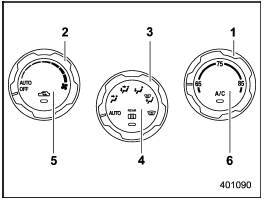
Control panel
1) Temperature control dial
2) Fan speed control dial
3) Airflow control dial
4) Control switch of the defogger and deicer system (Refer to “Defogger and
deicer”.)
5) Air inlet selection button
6) Air conditioner button
See also:
Engine Changes
Complete redesigns tend to bring the most dramatic changes, from the styling
to the mechanics. A few things have changed in the WRX drivetrain, but I fear
it's not enough. The 2008 model seems exa ...
To remove the cover housing
1. Rewind the cover.
2. Hold down the button on the righthand rear quarter panel and lift up the right-hand
cover housing.
3. Remove the cover housing. ...
Dome light
1. Remove the lens by prying the edge of the lens with a flat-head screwdriver.
2. Turn the bulb until the flat surfaces at its ends are aligned vertically.
3. Pull the bulb straight downward to ...