


Trunk light (Legacy)
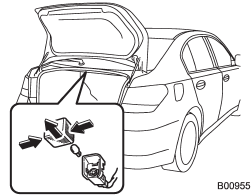
1. Push both sides of the light cover, and then remove the cover by pulling it out.
2. Pull the bulb out of the socket.
3. Install a new bulb.
4. Reinstall the cover.
See also:
Pocket (if equipped)
CAUTION
Do not use the pocket as an ashtray or leave a lighted cigarette in the pocket.
This could cause a fire.
To use the pocket, open the lid. ...
Examples of the types of accidents in which the SRS side airbag and SRS curtain
airbag will basically not deploy.
1) The vehicle is involved in frontal collision with another vehicle (moving
or stationary).
2) The vehicle is struck from behind.
3) The vehicle pitches end over end.
In the event of accidents ...
Refueling in cold weather
To help prevent moisture from forming in the fuel system and the risk of its freezing, use of an antifreeze additive in the fuel tank is recommended during cold weather.
Use only additives that are s ...