


Feature of distance marker
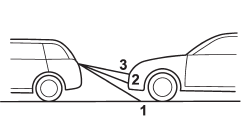
1) 3 feet (1 m) line
2) 6.5 feet (2 m) line
3) 10 feet (3 m) line
The distance marker shows the distance on the road. If there is a car or other object close behind, distance cannot be correctly displayed.
See also:
If the light illuminates steadily
If the light illuminates steadily while driving
or does not turn off after the engine starts,
an emission control system malfunction
has been detected.
You should have your vehicle checked by
...
Two separate circuits
Your vehicle has a dual circuit brake system. Each circuit works diagonally across
the vehicle. If one circuit of the brake system should fail, the other half of the
system still works. If one cir ...
Turbo models
The engine is designed to operate at maximum performance using premium unleaded
gasoline with an octane rating of 93 AKI or higher. If 93 AKI fuel is not readily
available in your area, unleaded g ...