


Using the cover
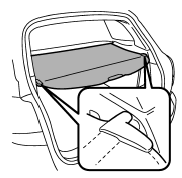
To extend the cover, pull the end of the cover out of the housing, then insert its hooks into the catches as shown. To rewind it, unhook it from the catches and it will rewind automatically. You should hold on to the cover and guide it back into the cover housing while it is rewinding.
WARNING
Do not place anything on the extended cover. Putting excessive weight on the extended cover can break it and an object on the cover could tumble forward in the event of a sudden stop or collision. This could cause serious injury.
CAUTION
● Be careful not to scratch the rear gate stays while extending and rewinding the cover. Scratches on the stays could cause leakage of gas from the stays, which may result in their inability to hold the rear gate open.
● When reclining the rear seatback, move the front cover backward so that the cover is not damaged.
See also:
Drive belts
It is unnecessary to check the deflection of the drive belt periodically because
your engine is equipped with an automatic belt tension adjuster. However, replacement
of the belt should be done ac ...
Glossary of tire terminology
- Accessory weight
The combined weight (in excess of
those standard items which may be
replaced) of automatic transmission,
power steering, power brakes,
power windows, power seats, radio,
...
Removal and installation of the crossbars
Removal and installation of the crossbars
Each of the two roof moldings has two
mounting points for crossbars. Each
mounting point is fitted with a cover. Use
a screwdriver to remove the co ...