


Voice command system
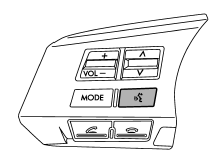
Talk switch
To turn on the voice command system, press the talk switch
 briefly. To turn off the voice command
system, press the talk switch for more
than 1.5 seconds.
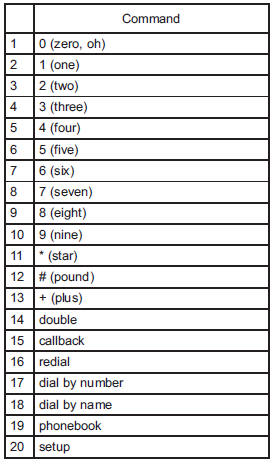
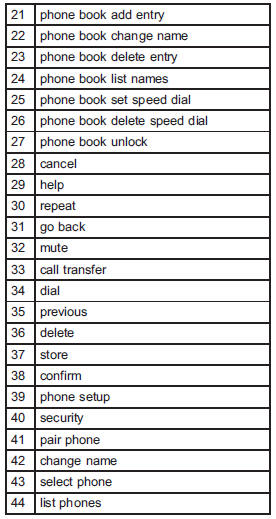
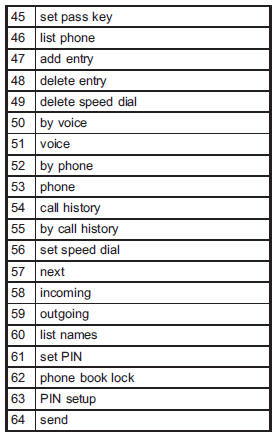
The commands available for the voice command system are listed in the following chart.
See also:
Cruise control
Cruise control enables you to maintain a
constant vehicle speed without holding
your foot on the accelerator pedal and it is
operative when the vehicle speed is 25
mph (40 km/h) or more. Make ...
Snow tires
• When replacing original tires with winter (snow) tires, make sure you use only the same size, construction and load range as the original tires listed on the tire placard. Using other sizes and ...
To change mode of driver’s control center differential
Press the “AUTO-MANU” switch on the center console to switch from auto mode to manual mode or vice versa. When you select the auto mode, the “AUTO” indicator light illuminates. When you select the m ...