


Illumination brightness control
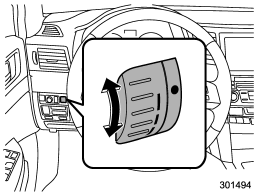
The illumination brightness of the clock display, audio, air conditioner, multi function display and meter/gauge dims under the following conditions.
● when the light switch is in the “ ” or “ ” position
● when the light switch is in the “AUTO” position and the headlights illuminate automatically
You can adjust the illumination brightness for better visibility.
To brighten, turn the control dial upward.
To darken, turn the control dial downward.
NOTE
● When the control dial is turned fully upward, the illumination brightness becomes the maximum and the automatic dimming function does not work at all.
● The brightness setting is not canceled even when the ignition switch is turned to the “LOCK” position.
See also:
Bottle holders
CAUTION
● Do not pick up a bottle from the bottle holder or put a bottle in the holder
while you are driving, as this may distract you and lead to an accident.
● When placing a beverag ...
Replacing the air cleaner element
Replace the air cleaner element according to the maintenance schedule in the
“Warranty and Maintenance Booklet”. Under extremely dusty conditions, replace it
more frequently. It is recommended tha ...
Washer
To wash the rear window while the rear wiper is operating, turn the knob clockwise to the “” position. The washer fluid sprays until you release the knob.
To wash the rear window when the rear wiper ...