


Remote control mirror switch
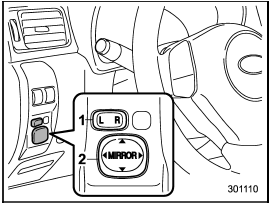
Remote control mirror switch
1) Selection switch
2) Direction control switch
The remote control mirrors operate only when the ignition switch is in the “ON” or “Acc” position.
1. Press either end of the selection switch, “L” for the left, “R” for the right.
2. Move the direction control switch in the direction you want to move the mirror.
3. Return the selection switch to the neutral position to prevent unintentional operation.
The mirrors can also be adjusted manually.
See also:
Drugs and driving
There are some drugs (over the
counter and prescription) that can
delay your reaction time and impair
your perception, judgment and attentiveness.
If you drive after taking
them, it may i ...
Voice command system
Talk switch
To turn on the voice command system, press the talk switch
briefly. To turn off the voice command
system, press the talk switch for more
than 1.5 seconds.
The commands available ...
Airflow control buttons
Each airflow control button activates the following air outlets.
: Instrument panel outlets
: Instrument panel outlets and foot
outlets
: Foot outlets, both side outlets of
the instrument p ...