


Sounding a panic alarm
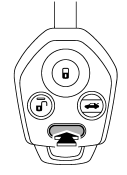
To activate the alarm, press the “PANIC” button once.
The horn will sound and the turn signal lights will flash.
To deactivate the panic alarm, press any button on the remote transmitter. If a button on the remote transmitter is not pressed, the alarm will be deactivated after approximately 30 seconds.
See also:
Summer tires
Summer tires are high-speed capability tires best suited for highway driving under dry conditions.
Summer tires are inadequate for driving on slippery roads such as on snowcovered or icy roads.
If y ...
Check the fluid level monthly.
1. Drive the vehicle several miles to raise the temperature of the transmission
fluid up to normal operating temperature; 158 to 1768F (70 to 808C) is normal.
2. Park the vehicle on a level surface ...
To select a track from its beginning
Turn the “TUNE/TRACK/CH” dial clockwise
to skip to the beginning of the next
track/file. Each time the dial is turned, the
indicated track/file number will increase.
Turn the “TUNE/TRACK/CH” ...