


Battery drainage prevention function
If a door or the rear gate (Outback) is not completely closed, the interior lights will remain illuminated as a result. However, several lights are automatically turned off by the battery drainage prevention function to prevent the battery from going dead. The following interior lights are affected by this function.
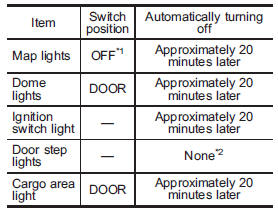
*1: The map lights can be controlled by the battery drainage prevention function only when the map light switches are in the OFF position and the door interlock switch is in the DOOR position. For the switch positions, refer to “Map light” F6-2.
*2: The door step lights are not affected by the battery drainage prevention function, so the lights do not turn off automatically. To turn off the lights, it is necessary that each door is completely closed.
The operational/non-operational setting of this function can be changed by a SUBARU dealer. Contact the nearest SUBARU dealer if you would like to change the setting.
NOTE
● The factory setting (default setting) for this function is set as “operational”.
● When leaving the vehicle, please make sure that all doors and the rear gate (Outback) are completely closed.
● The battery drainage prevention function does not operate while the key is in the ignition switch.
See also:
Starting your vehicle
NOTE
All vehicle doors, the engine hood and trunk / rear gate must be closed prior
to activating the remote engine start system. Any open entry point will prevent
starting or cause the system t ...
When there is no CD inserted
Insert a CD by referring to “How to insert a CD (type A)” F5-19 / “How to insert
a CD (s) (type B)” F5-19.
When a CD is loaded, the player will start playback of the CD, beginning with
the first ...
Top tether anchorages
Your vehicle is equipped with three top
tether anchorages so that a child restraint
system having a top tether can be
installed in the rear seat. When installing
a child restraint system using ...