


Instrument panel
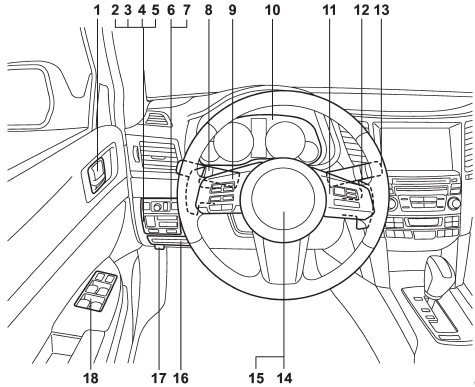
1) Door locks (page 2-4)
2) Electronic parking brake switch (page 7-34)
3) Hill Holder switch (page 7-36)
4) Trunk lid opener switch (page 2-24)
5) Vehicle Dynamics Control OFF switch (page 7-31)
6) Remote control mirror switch (page 3-51)
7) Illumination brightness control (page 3-30)
8) Light control switch (page 3-27)
9) Audio control buttons (page 5-31)
10) Combination meter (page 3-5)
11) Cruise control (page 7-38)
12) Paddle shift (page 7-22)
13) Wiper control lever (page 3-31)
14) Horn (page 3-52)
15) SRS airbag (page 1-38)
16) Fuse box (page 11-46)
17) Hood lock release knob (page 11-7)
18) Power windows (page 2-20)
See also:
Spark plugs
It may be difficult to replace the spark plugs. It is recommended that you have
the spark plugs replaced by your SUBARU dealer.
The spark plugs should be replaced according to the maintenance sched ...
Exterior
A sporty wagon that can get me where I need to go quickly and safely
shouldn't have to worry about what it looks like. It's just that I know those
crafty Subaru engineers can put together a sharp- ...
Air filtration system
Your vehicle’s air conditioning system is equipped with an air filtration system.
Replace the air filter element according to the replacement schedule shown in the
following table. This schedule s ...