


Type A
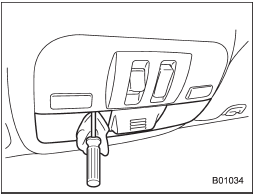
1. Remove the lens by prying the edge of the lens with a flat-head screwdriver.
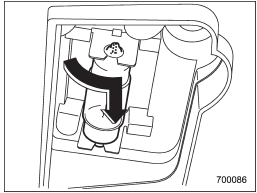
2. Turn the bulb until the flat surfaces at its ends are aligned vertically. Pull the bulb straight downward to remove it.
3. Install a new bulb.
4. Reinstall the lens.
See also:
Temporary spare tire
When a spare tire is mounted or a wheel rim is replaced without the original pressure sensor/transmitter being transferred, the low tire pressure warning light will illuminate steadily after blink ...
High beam light bulbs
Right-hand side
1. Use a screwdriver to undo the clips on the air intake duct, then remove the air intake duct (right-hand side).
Left-hand side
2. Use a screwdriver to remove the secured clip of t ...
Head restraint adjustment
1) Head restraint
2) Release button
Both the driver’s seat and the front passenger’s seat are equipped with head
restraints.
The head restraint should be adjusted so that the center of the head ...