


Catalytic converter
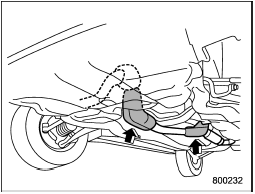
Turbo models
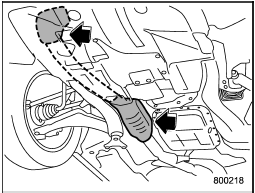
Non-turbo models
The catalytic converter is installed in the exhaust system. It serves as a catalyst to reduce HC, CO and NOx in exhaust gases, thus providing cleaner exhaust.
To avoid damage to the catalytic converter:
• Use only unleaded fuel. Even a small amount of leaded fuel will damage the catalytic converter.
• Never start the engine by pushing or pulling the vehicle.
• Avoid racing the engine.
• Never turn off the ignition switch while the vehicle is moving.
• Keep your engine tuned-up. If you feel the engine running rough (misfiring, backfiring or incomplete combustion), have your vehicle checked and repaired by an authorized SUBARU dealer.
• Do not apply undercoating or rust prevention treatment to the heat shield of catalytic converter and the exhaust system.
• Do not drive with an extremely low fuel level.

• Avoid fire hazards. Do not drive or park the vehicle anywhere near flammable materials (e.g., grass, paper, rags or leaves), because the catalytic converter operates at very high temperatures.
• Keep everyone and flammable materials away from the exhaust pipe while the engine is running.
The exhaust gas is very hot.
See also:
Deleting the speed dial
1. Select the “PHONE BOOK” menu.
2. Select “DEL SPD DIAL” by operating the “TUNE/TRACK/CH” dial or select “DELETE SPEED DIAL” by using the voice command system.
Preset buttons
3. Press the preset b ...
N (Neutral)
This position is for restarting a stalled engine.
In this position the wheels and transmission are not locked. In this position,
the transmission is neutral; the vehicle will roll freely, even on t ...
Door open warning light
When the ignition switch is in the “ON” position, the door open warning light
illuminates for approximately 2 seconds and then turns off.
The door open warning light illuminates if any door, the ...