


Using the select lever
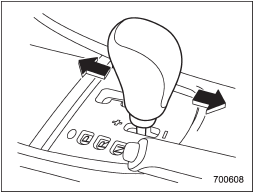
Shift to the next-higher gear by briefly pushing the select lever toward the “+” end of the manual gate.
Shift to the next-lower gear by briefly pulling the select lever toward the “−” end of the manual gate.
See also:
When “CHECK DISC” is displayed
Press the eject button to unload the discs.
Check that the disc is not damaged or scratched, and also check that the disc is inserted correctly. This message may appear when using some CD-RW discs.
...
Seatbelt safety tips
WARNING
● All persons in the vehicle should fasten their seatbelts BEFORE the vehicle
starts to move. Otherwise, the possibility of serious injury becomes greater in
the event of a sudden s ...
ABS (Anti-lock Brake System)
The ABS system prevents the lock-up of
wheels which may occur during sudden
braking or braking on slippery road surfaces.
This helps prevent the loss of
steering control and directional stabili ...