


Selection of manual mode
NOTE
Please read the following points carefully and bear them in mind when using the manual mode.
• If you attempt to shift down when the engine speed is too high, i.e., when a downshift would push the tachometer needle beyond the red zone, beeps will be emitted to warn you that the downshift is not possible.
• If you attempt to shift up when the vehicle speed is too low, the transmission will not respond.
• You can perform a skip-shift (for example, from 4th to 2nd) by operating the select lever twice in rapid succession.
• The transmission automatically selects 1st gear when the vehicle stops moving.
• If the temperature of the automatic transmission fluid becomes too high, the “AT OIL TEMP” warning light will illuminate and upshifts to 4th gear will not be possible. Immediately stop the vehicle in a safe place and let the engine idle until the warning light turns off.
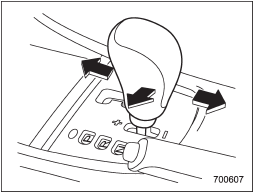
With the vehicle either moving or stationary, move the select lever from the “D” position to the manual gate then move it to the “+” end or “−” end of the manual gate to select manual mode.
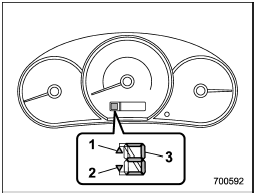
1) Upshift indicator
2) Downshift indicator
3) Gear position indicator
When the manual mode is selected, the gear position indicator and upshift indicator and/or downshift indicator on the combination meter illuminate. The gear position indicator shows the currently selected gear in the 1st-to-4th-gear range.
The upshift and downshift indicators show when a gear shift is possible. When the upshift indicator “ ” is
illuminated, upshifting is possible. When the downshift indicator “
” is
illuminated, upshifting is possible. When the downshift indicator “ ” is illuminated,
downshifting is possible. When both indicators are illuminated, upshifting and downshifting are both possible. When the vehicle stops (for example, at traffic signals), the downshift indicator turns off.
” is illuminated,
downshifting is possible. When both indicators are illuminated, upshifting and downshifting are both possible. When the vehicle stops (for example, at traffic signals), the downshift indicator turns off.
Gear shifts can be performed by using the select lever (all models) or the paddle shift switch behind the steering wheel (if equipped).
See also:
Wheel replacement
When replacing wheels due, for example, to damage, make sure the replacement
wheels match the specifications of the wheels that are fitted as standard equipment.
Replacement wheels are available f ...
2011 Subaru Outback review
Somewhere amid the parade of crossovers and wagon-like vehicles is the Subaru
Outback. Once merely a version of the Legacy wagon, which has since been
discontinued, it's now a household name among ...
Shift lock release using the shift lock release button
Perform the following procedure to release the shift lock.
1. Apply the parking brake and stop the engine.
2. Remove the shift lock cover using a flat-head screwdriver. The shift lock release butt ...