


To remove the cover
1. Rewind the cover.
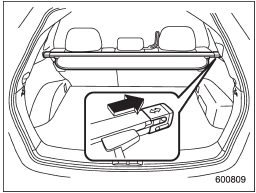
2. Push the bar to the right side and shorten the bar.
3. Take it off the retainer.
See also:
Examples of the types of accidents in which deployment of the
driver’s/driver’s and front passenger’s SRS frontal airbag(s) is unlikely to
occur.
1) The vehicle strikes an object, such as a
telephone pole or sign pole.
2) The vehicle slides under the load bed of
a truck.
3) The vehicle sustains an oblique offset
frontal impact.
4) Th ...
Operation
If the driver and/or front passenger have/ has not yet fastened the seatbelt(s)
when the ignition switch is turned to the “ON” position, the seatbelt warning light(s)
will flash for 6 seconds, to ...
Cooling fan, hose and connections
Your vehicle employs an electric cooling fan which is thermostatically controlled
to operate when the engine coolant reaches a specific temperature.
If the radiator cooling fan does not operate eve ...