


Glove box
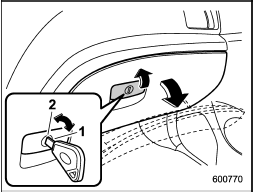
Glove box
1) Lock
2) Unlock
To open the glove box, pull the handle. To close it, push the lid firmly upward.
To lock the glove box, insert the key and turn it clockwise. To unlock the glove box, insert the key and turn it counterclockwise.
See also:
Auto-store (type D audio)
Using the Auto-store function, you can
automatically store 6 stations on the
current waveband (FM-AS or AM-AS) by
pressing the button for 1.5 seconds
or longer. Use Auto-store to quickly find ...
California proposition 65 warning
WARNING
Engine exhaust, some of its constituents, and certain vehicle components contain
or emit chemicals known to the State of California to cause cancer and birth defects
or other reproductive ...
To hook the top tether
To hook the top tether
1. Remove the head restraint at the window-side seating position where the child restraint system has been installed with the lower anchorages or seatbelt; lift up the head res ...