


Voice command system
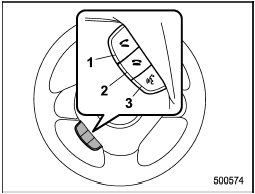
Voice command system
1) OFF hook switch
2) ON hook switch
3) Talk switch
To turn on the voice command system, press the talk switch  briefly. To
turn off the voice command system, wait for 5 seconds without using the voice command system.
briefly. To
turn off the voice command system, wait for 5 seconds without using the voice command system.
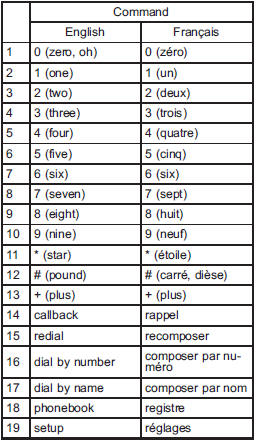
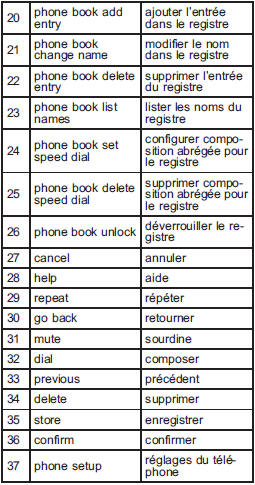
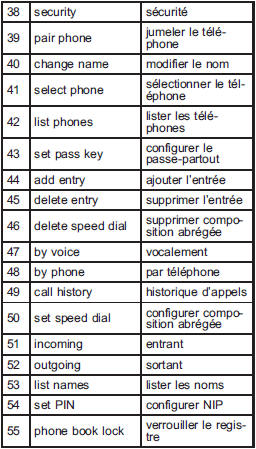
The commands available for the voice command system are listed in the following chart.
See also:
Skip channel selection
When in the SAT mode, press the following
button continuously (type A, B and C
audio)/briefly (type D audio) to change to
the channel selection mode.
Type A and B audio:
Type C audio:
Typ ...
Cleaning the interior
Use a soft, damp cloth to clean the climate control panel, audio equipment, instrument
panel, center console, combination meter panel, and switches. (Do not use organic
solvents.) ...
Roof rail (if equipped)
1) Roof rack
Luggage can be carried on the roof after
securing the roof rack to the roof rail.
When installing the roof rack on the roof
rail, follow the manufacturer’s instructions.
The ro ...