


Turning on/off the Hands-free mode
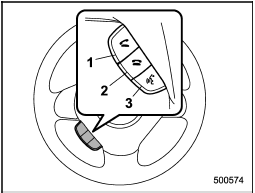
Turning on/off the Hands-free mode
1) OFF hook switch
2) ON hook switch
3) Talk switch
To turn on the Hands-free mode, press the OFF hook switch  . To turn off the Hands-free mode, press the ON hook switch
  .
.
See also:
Towing
WARNING
Never tow AWD vehicles (including AT, MT and CVT) with the front wheels raised
off the ground while the rear wheels are on the ground, or with the rear wheels
raised off the ground while ...
Selecting preset channels
Presetting a channel with a preset button allows you to select that channel in
a single operation. Up to six SAT1, SAT2 and SAT3 channels each may be preset. ...
To hook the top tether
1. Remove the headrest at the windowside
seating position where the child
restraint system has been installed with
the lower anchorages or seatbelt; lift up
the headrest while pressing the r ...