


Remote control mirror switch
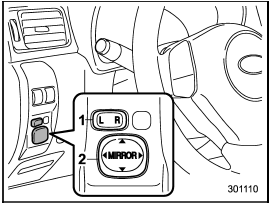
Remote control mirror switch
1) Selection switch
2) Direction control switch
The remote control mirrors operate only when the ignition switch is in the “ON” or “Acc” position.
1. Press either end of the selection switch, “L” for the left, “R” for the right.
2. Move the direction control switch in the direction you want to move the mirror.
3. Return the selection switch to the neutral position to prevent unintentional operation.
The mirrors can also be adjusted manually.
See also:
Seatbelt safety tips
WARNING
● All persons in the vehicle should fasten their seatbelts BEFORE the vehicle
starts to move. Otherwise, the possibility of serious injury becomes greater in
the event of a sudden s ...
Towing
If towing is necessary, it is best done by
your SUBARU dealer or a commercial
towing service. Observe the following
procedures for safety.
Never tow AWD models (both AT and
MT) with t ...
Checking the oil level
1) Yellow handle
Check the oil level monthly.
1. Park the vehicle on a level surface and
stop the engine.
2. Pull out the level gauge, wipe it clean,
and insert it again.
1) Upper level
...