


Operating the windows
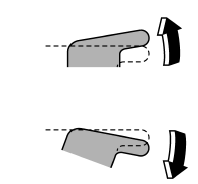
To open: Press the switch down and hold it until the window reaches the desired position.
To close: Pull the switch up and hold it until the window reaches the desired position. When the lock switch on the power window switch cluster, located on the driver’s side door, is in the lock position, the passengers’ windows cannot be operated with the passengers’ switches.
See also:
Glossary of tire terminology
● Accessory weight
The combined weight (in excess of those standard items which may be replaced)
of automatic transmission, power steering, power brakes, power windows, power seats,
radio, ...
Rear gate (Outback) – if the rear gate cannot be unlocked
In the event that you cannot unlock the rear gate by operating the power door
locking switches or the remote keyless entry system, you can unlock it from inside
the cargo area.
1. Remove the ac ...
2011 Subaru Legacy review
The Subaru Legacy has been redesigned for 2010 and now boasts a bigger
backseat and improved gas mileage, with the same nimble steering the 2009 model
had. Snowbelt drivers will appreciate its sta ...