


Passengers’ side switches
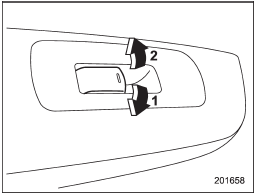
Passengers’ side switches
1) Open
2) Close
To open:
Push the switch down and hold it until the window reaches the desired position.
To close:
Pull the switch up and hold it until the window reaches the desired position.
When the lock switch on the power window switch cluster, located on the driver’s side door, is in the “LOCK” position, the passengers’ windows cannot be operated with the passengers’ switches.
See also:
Infants or small children
Use a child restraint system that is suitable for your vehicle. Refer to “Child
restraint systems” F1-25. ...
Mirrors
Always check that the inside and outside mirrors are properly adjusted before
you start driving. ...
Installing forward facing child restraint
Installing forward facing child restraint
1. Place the child restraint system in the rear seating position.
2. Run the lap and shoulder belt through or around the child restraint system following th ...