


Control panel
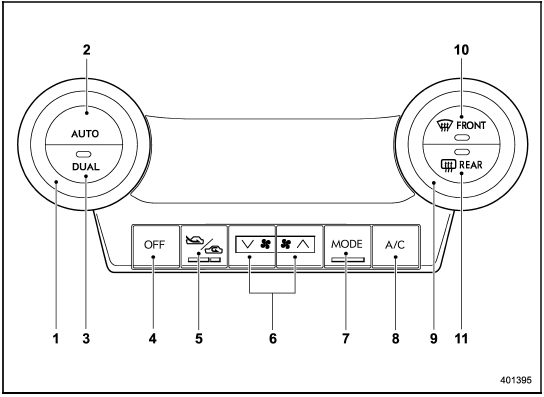
Control panel
1) Temperature control dial (driver’s side)
2) AUTO button
3) DUAL mode button
4) OFF button
5) Air inlet selection button
6) Fan speed control button
7) Airflow mode selection button
8) Air conditioner button
9) Temperature control dial (front passenger’s side)
10) Defroster button
11) Rear window defogger button (Refer to “Defogger and deicer”.)
See also:
Programming rolling-code-protected garage door openers in the U.S.A.
If your garage door opener has a rolling
code feature, program the HomeLink®
Wireless Control System for it by following
steps 1 through 5 in “Garage door opener
programming in the U.S.A.”. Th ...
Summer tires
Summer tires are high-speed capability tires best suited for highway driving under dry conditions.
Summer tires are inadequate for driving on slippery roads such as on snowcovered or icy roads.
If y ...
2011 Subaru Impreza WRX STi review By Scott Burgess
We all play favorites. Is that why we have elections? Or is it just for the
commercials?
In the automotive world, car buyers play favorites as well ∔ weighing the
pros and cons of differ ...