


Installing a rearward facing child restraint
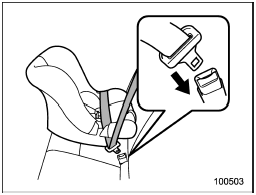
Installing a rearward facing child restraint
1. Place the child restraint system in the rear seating position.
2. Run the lap and shoulder belt through or around the child restraint system following the instructions provided by its manufacturer.
3. Insert the tongue plate into the buckle until you hear a click.
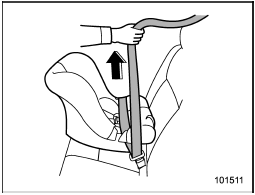
4. Take up the slack in the lap belt.
5. Pull out the seatbelt fully from the retractor to change the retractor over from the Emergency Locking Retractor (ELR) to the Automatic Locking Retractor (ALR) function. Then, allow the belt to rewind into the retractor. As the belt is rewinding, clicks will be heard which indicate the retractor functions as ALR.
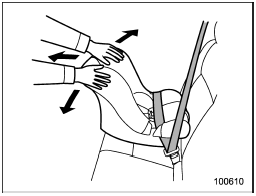
6. Push and pull the child restraint system forward and from side to side to check if it is firmly secured. Sometimes a child restraint can be more firmly secured by pushing it down into the seat cushion and then tightening the seatbelt.
7. Pull at the shoulder portion of the belt to confirm that it cannot be pulled out (ALR properly functioning).
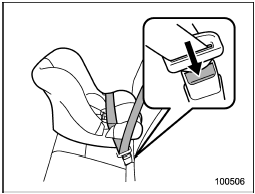
8. To remove the child restraint system, press the release button on the seatbelt buckle and allow the belt to retract completely. The belt will return to the ELR mode.

NEVER INSTALL A REARWARD FACING CHILD SEAT IN THE FRONT PASSENGER’S SEAT. DOING SO RISKS SERIOUS INJURY OR DEATH TO THE CHILD BY PLACING THE CHILD’S HEAD TOO CLOSE TO THE SRS AIRBAG.
NOTE
When the child restraint system is no longer in use, remove it and restore the ELR function of the retractor. That function is restored by allowing the seatbelt to retract fully.
See also:
Select lever/gear position indicator
1) Upshift/downshift indicator (AT and CVT models)
This indicator shows the position of the shift lever (MT models) or select lever
(AT and CVT models). ...
Winter (snow) tires
Winter tires are best suited for driving on
snow-covered and icy roads. However
winter tires do not perform as well as
summer tires and all season tires on roads
other than snow-covered and ic ...
Setting the playing speed (only when
the audiobook is playing) (type D audio)
Each time you briefly press (the
“RPT” button) while the audiobook is
playing, the playing speed changes in
the following sequence.
...