


Repeating
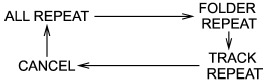
Repeating is operated in the same way a CD is played. Refer to “Repeating”.
Each time you briefly press the  button (type C audio)/
  button (the
“RPT” button) (type D audio), the mode
changes in the following sequence.
button (the
“RPT” button) (type D audio), the mode
changes in the following sequence.
See also:
To install the cover housing
1. Remove the cover of the retainers by
prying on the edge with a flat-head
screwdriver.
2. Insert the projections located on the
both ends of the sleeve into the recesses
of the reta ...
Driving with pets
Unrestrained pets can interfere with your driving and distract your attention from driving. In a collision or sudden stop, unrestrained pets or cages can be thrown around inside the vehicle and hurt y ...
Drive belts
It is unnecessary to check the deflection of the drive belt periodically because
your engine is equipped with an automatic belt tension adjuster. However, replacement
of the belt should be done ac ...