


Type A audio set (if equipped)
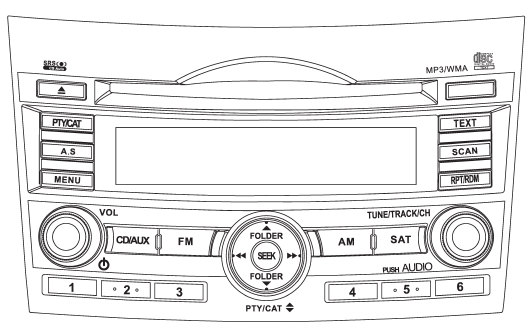
The audio set will operate only when the ignition switch is in the “Acc” or “ON” position.
● Power and sound controls: refer to page 5-6 ● Radio operation: refer to page 5-9 ● Satellite radio operation (if equipped): refer to page 5-13 ● CD (compact disc) player operation: refer to page 5-18 ● Auxiliary input jack: refer to page 5-28
See also:
Tire pressure monitoring system (TPMS) (if equipped)
The tire pressure monitoring system provides the driver with a warning message
by sending a signal from a sensor that is installed in each wheel when tire pressure
is severely low.
The tire pre ...
Manual mode
In the manual mode, you can use the center differential control switch to adjust the initial LSD torque as desired. When this mode is selected, the “AUTO” indicator light on the combination meter tu ...
Operation
A) Driver’s side
B) Passenger’s side
1) SRS AIRBAGs deploy as soon as a collision occurs.
2) After deployment, SRS AIRBAGs start to deflate immediately so that the
driver’s vision is not obstru ...