


Display selection (type A, B and C audio)
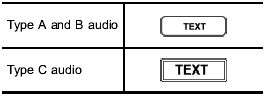
If you press the “TEXT” button during playback, the display will change as shown in the following sequence.
For CD-DA:
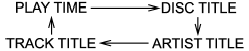
For MP3/WMA/AAC:
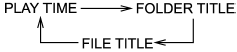
For iPod®:
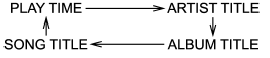
See also:
Installation of accessories
Always consult your SUBARU dealer before installing fog lights or any other electrical equipment in your vehicle. Such accessories may cause the electronic system to malfunction if they are incorrectl ...
Air cleaner element
Do not operate the engine with the air cleaner element removed. The air cleaner element not only filters intake air but also stops flames if the engine backfires. If the air cleaner element is not ...
Efficient cooling after parking in direct sunlight
After parking in direct sunlight, drive with the windows open for a few minutes
to allow outside air to circulate into the heated interior. This results in quicker
cooling by the air conditioner. ...