


Seek tuning (SEEK)
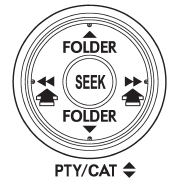
If you press the “ ” or “
 ”
”
side of the “SEEK” button briefly, the radio will automatically search for a receivable
station and stop at the first one it finds. This function may not be available,
however, when radio signals are weak. In such a situation, perform manual tuning
to select the desired station.
See also:
For AT models
This light flashes if the vehicle is driven with tires of different diameters
fitted on its wheels or with the air pressure excessively low in any of its tires. ...
When CD is in the player (type C)
When CD is in the player (type C)
Each brief press of the “CD/AUX” button changes the modes in the following sequence.
When the CD mode is selected, the player will start playback. ...
Windows
WARNING
To avoid serious personal injury caused by entrapment, always conform to the
following instructions without exception.
● When operating the power windows, be extremely careful to pre ...