


Bi-level heating
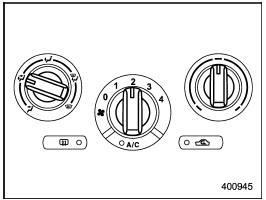
Bi-level heating
This setting allows you to direct air of different temperatures from the instrument panel and foot outlets. The air from the foot outlets is slightly warmer than from the instrument panel outlets.
1. Set the air inlet selection button to the OFF position.
2. Set the airflow control dial to the “ ”
position.
”
position.
3. Set the temperature control dial to the desired temperature level.
4. Set the fan speed control dial to the desired speed.
Setting the temperature control dial fully turned to the red area or blue area decreases the temperature difference between the air from the instrument panel outlets and the air from the foot outlets.
See also:
Auto-dimming mirror/compass (if equipped)
Auto-dimming mirror/compass (if equipped)
1) Auto dimming indicator
2) Left (mirror) button
3) Photosensor
4) Right (compass) button
5) Compass display
The auto-dimming mirror has an anti-glare ...
Cooling and dehumidifying in high humidity and low temperature weather condition
Under certain weather conditions (high relative humidity, low temperatures, etc.)
a small amount of water vapor emission from the air outlets may be noticed. This
condition is normal and does not ...
Towing
If towing is necessary, it is best done by your SUBARU dealer or a commercial towing service. Observe the following procedures for safety.
Never tow AWD models (both AT and MT) with the front w ...