


Turn signal lever
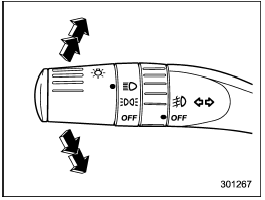
Turn signal lever
To activate the right turn signal, push the turn signal lever up. To activate the left turn signal, push the turn signal lever down. When the turn is finished, the lever will return automatically. If the lever does not return after cornering, return the lever to the neutral position by hand.
To signal a lane change, push the turn signal lever up or down slightly and hold it during the lane change. The turn signal indicator lights will flash in the direction of the turn or lane change. The lever will return automatically to the neutral position when you release it.
See also:
Overhead console
To open the console, push on the lid lightly and it will automatically open.
CAUTION
When your vehicle is parked in the sun or on a warm day, the inside of the overhead
console heats up. Avoid s ...
Floor mat
Floor mat
Retaining pins are located on the driver’s
side floor.
The floor mat is secured using the built-in
grommets, by placing the grommets over
the pins and pushing them downward.
...
FM/AM selection
Push the “FM/AM” button when the radio
is off to turn on the radio.
Push the “FM/AM” button when the radio
is on to select the reception.
Each brief press of the “FM/AM” button
changes the r ...