


Setting the playing speed (only when the audiobook is playing) (type D audio)
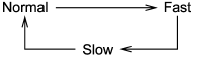
Each time you briefly press  (the
“RPT” button) while the audiobook is
playing, the playing speed changes in
the following sequence.
(the
“RPT” button) while the audiobook is
playing, the playing speed changes in
the following sequence.
See also:
To activate/deactivate the Hill start assist system (STI)
While the Hill start assist system is deactivated, when starting on an uphill grade, braking power is not maintained if the brake pedal is released. Start on an uphill grade by using the parking b ...
SPEED VOLUME setting
SPEED VOLUME CONTROL is a function that automatically adjusts the volume according to the vehicle speed. As the vehicle speed increases, the audio volume automatically increases to match the vehicle s ...
SRS airbag system warning light
When the ignition switch is turned to the “ON” position, the SRS airbag system
warning light will illuminate for approximately 6 seconds and turn off. This shows
the SRS frontal airbag and SRS sid ...