


Abbreviation list
Subaru Forester / Subaru Forester Owners Manual / How to use this Owner’s Manual / Abbreviation list
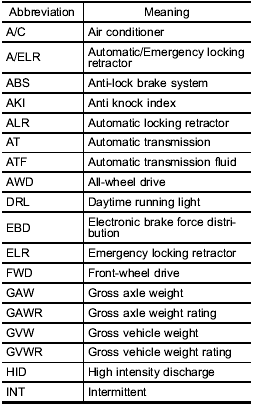
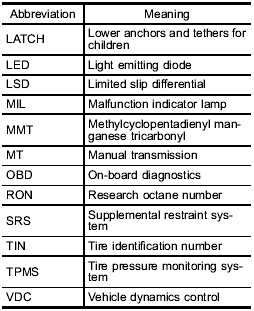
You will find several abbreviations in this manual. The meanings of the abbreviations are shown in the following list.
See also:
EXTERIOR
The 2011 STi oozes speed. My test vehicle was the new four-door wide-body
sedan with an intimidating-looking rear spoiler intended to amplify the car's
aerodynamics. The spoiler definitely took a ...
Adjustable level of each mode
*Only when an AUX audio product is connected. ...
Folding down the rear seatback
- When you fold down the seatback,
confirm that there are no
passengers or objects on the
rear seat. Not doing so creates
a risk of injury or property damage
if the seatback suddenly
f ...