


Front position light
Subaru Legacy / Subaru Legacy Owners Manual / Maintenance and service / Replacing bulbs / Front position light
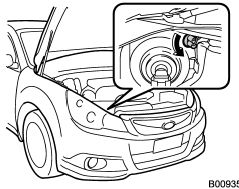
1. Turn the socket counterclockwise and pull it out.
2. Pull out the bulb from the socket and replace the bulb with a new one.
See also:
Rear window wiper blade rubber
1. Pull out the end of the blade rubber
assembly to unlock it from the plastic
support.
2. Pull the blade rubber assembly out of
the plastic support.
1) Metal spines
3. If the new blade ...
Station preset
Preset buttons (type A and B audio)
Preset buttons (type C audio) ...
Forward and backward adjustment
Pull the lever upward and slide the seat to the desired position. Then release
the lever and try to move the seat back and forth to make sure that it is securely
locked into place. ...