


Vanity mirror light
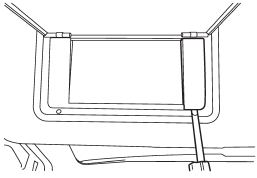
1. Remove the lens by prying the edge of the lens with a flat-head screwdriver.
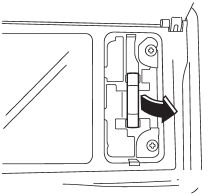
2. Pull the bulb out of the socket.
3. Install a new bulb.
4. Reinstall the lens.
See also:
Checking the fluid level when the fluid is cold
When the fluid level has to be checked without time to warm up the automatic
transmission, check to see that the fluid level is between the lower level and upper
level on the “COLD” range. If it i ...
Unfastening the rear seatbelts seatbelt
Push the button on the buckle.
Before closing the door, make sure that the belts are retracted properly to avoid
catching the belt webbing in the door. ...
Vehicle Dynamics Control OFF switch
Pressing the switch to deactivate the Vehicle Dynamics Control system can facilitate
the following operations.
● a standing start on a steeply sloping road with a snowy, gravel-covered, or ...