


Selection of manual mode
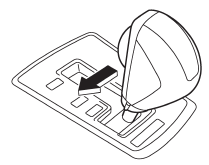
With the vehicle either moving or stationary, move the select lever from the “D” position to the “M” position to select the manual mode.
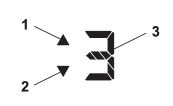
1) Upshift indicator
2) Downshift indicator
3) Gear position indicator
When the manual mode is selected, the gear position indicator and upshift indicator and/or downshift indicator on the combination meter illuminate. The gear position indicator shows the currently selected gear in the 1st-to-5th-gear range (AT models) or 1st-to-6th gear range (CVT models). The upshift and downshift indicators show when a gearshift is possible. When the upshift indicator “ ” is on, upshifting is possible. When the downshift indicator “ ” is on, downshifting is possible. When both indicators are on, upshifting and downshifting are both possible. When the vehicle stops (for example, at traffic signals), the downshift indicator turns off.
Gearshifts can be performed using the paddle shift switch behind the steering wheel.
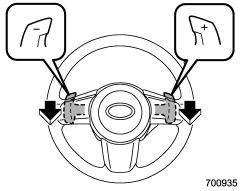
Pull the “+” of the paddle shift to upshift one level. Also pull the “−” of the paddle shift to downshift one level.
To deselect the manual mode, return the select lever to the “D” position from the “M” position.
While driving with the select lever in the “D” position, if you change gears by paddle shifting, the gear position indicator light illuminates and shows the current gear condition.
CAUTION
Do not place or hang anything on the paddle shift levers. Doing so may result in accidental gear shifting.
NOTE
Please read the following points carefully and bear them in mind when using the manual mode.
● If you attempt to shift down when the engine speed is too high, i.e., when a downshift would push the tachometer needle beyond the red zone, beeps will be emitted to warn you that the downshift is not possible.
● If you attempt to shift up when the vehicle speed is too low, the transmission will not respond.
● You can perform a skip-shift (for example, from 4th to 2nd) by operating the paddle switch twice in rapid succession.
● The transmission automatically selects 1st gear when the vehicle stops moving.
● If the temperature of the transmission fluid becomes too high, the “AT OIL TEMP” warning light will illuminate. Immediately stop the vehicle in a safe place and let the engine idle until the warning light turns off.
See also:
Turbo models
Turbo models
1) Power steering fluid reservoir
2) Differential gear oil level gauge (AT)
3) Clutch fluid reservoir
4) Automatic transmission fluid level gauge
5) Brake fluid reservoir
6) ...
Maximum load limits
WARNING
Never exceed the maximum load limits explained in the following. Exceeding the
maximum load limits could cause personal injury and/or vehicle damage.
CAUTION
● Adequate size trailer ...
Unleaded gasoline
The neck of the fuel filler pipe is designed to accept only an unleaded gasoline filler nozzle. Under no circumstances should leaded gasoline be used because it will damage the emission control system ...