


Difference between screen and actual road
The distance markers show the distance for a level road when the vehicle is not loaded. It may be different from the actual distance depending on the loading conditions or road conditions.
When there is an upward slope at the back
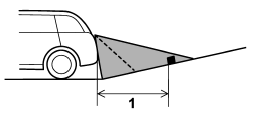
1) 3 feet (1 m)
The distance on the screen looks farther than the actual distance.
When there is a downward slope at the back
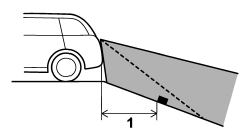
1) 3 feet (1 m)
The distance on the screen looks nearer than the actual distance.
NOTE
When cargo is loaded, the rear view distance on the screen looks farther than the actual distance as in an upward slope.
See also:
Map light
Models with moonroof
Models without moonroof
To turn on the map light, press the switch.
To turn it off, press the switch again.
When leaving the vehicle, make sure the lights are turned off t ...
Vehicle Dynamics Control warning light/Vehicle Dynamics Control operation indicator
light
The light illuminates when the ignition switch is turned to the “ON” position
and turns off several seconds after the engine has started. This lighting pattern
indicates that the Vehicle Dynamic ...
Odometer
This meter displays the odometer when the ignition switch is in the “ON” position.
The odometer shows the total distance that the vehicle has been driven.
If you press the trip knob when the igni ...