


MUTE button (if equipped)
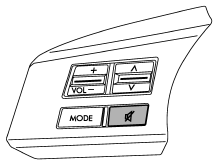
Press this button if you wish to immediately cut the volume to zero.
The audio display will show “MUTE”. If you press the button again, the original sound volume will return and “MUTE” turns off.
See also:
Cooling fan, hose and connections
Your vehicle employs an electric cooling fan which is thermostatically controlled to operate when the engine coolant reaches a specific temperature.
If the radiator cooling fan does not operate even ...
Volume control buttons
Models without Hands-free system
Models with Hands-free system
Press the “+” button to increase the volume. Press the “−” button to reduce the volume.
A number indicating the volume will be s ...
Installation of accessories
Always consult your SUBARU dealer before installing a citizen band radio or other transmitting device in your vehicle.
Such devices may cause the electronic control system to malfunction if they are ...