


High mount stop light (4- door) (except LED [Light Emitting Diode] type)
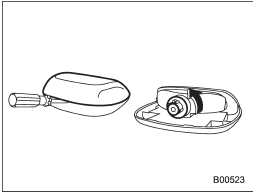
1. Remove the high mount stop light cover by prying the edge with a screwdriver.
2. Remove the bulb socket from the high mount stop light assembly by turning it counterclockwise.
3. Pull the bulb out of the socket.
4. Install a new bulb.
5. Reinstall the cover.
See also:
How to insert a CD (type A, C and D)
Hold a disc with a finger in the center hole
while gripping the edge of the disc, then
insert it in to the slot (with the label side
up) and the player will automatically pull
the disc into po ...
Off road driving
WARNING
● Always maintain a safe driving speed according to the road and weather conditions
in order to avoid having an accident on a sharp turn, during sudden braking or under
other simila ...
ON
This is the normal operating position after the engine is started. ...