


“up” and “down” switch
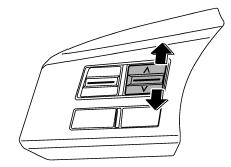
With radio mode selected
Press the switch to the “ ” or “
 ”
”
side briefly to skip to a preset channel. Press the switch to the “”
or “” side for more than 0.5 second
to seek the next receivable station and stop at it.
That station’s frequency will be indicated on the audio display.
With CD mode selected
Press the switch to the “” side
to skip forward in the track/file (track) order. Press the switch to the “”
side to skip back ward in the track/file (track) order. The track/file (track) number
will be shown on the audio display.
With SAT mode selected
Press the switch to the “” side
to skip forward in the channel order. Press the switch to the “”
side to skip backward in the channel order. When the switch is briefly pressed,
the channel will skip every 1 channel. When the switch is pressed for more than
0.5 second, the channel will skip every 10 channels. The channel will be shown on
the audio display.
See also:
Behavior with key lock-in prevention function operational
With the driver’s door open, the doors are automatically kept unlocked even if
the front side of the power door locking switch is pressed. ...
Headlight flasher
CAUTION
Do not hold the lever in the flashing position for more than just a few seconds.
To flash the headlights, pull the lever toward you and then release it. The high
beam will stay on for as ...
Engine hood
To open the hood:
1. If the wiper blades are lifted off the windshield, return them to their original
positions.
2. Pull the hood release knob under the instrument panel.
3. Release the secon ...